# Send message via Viber

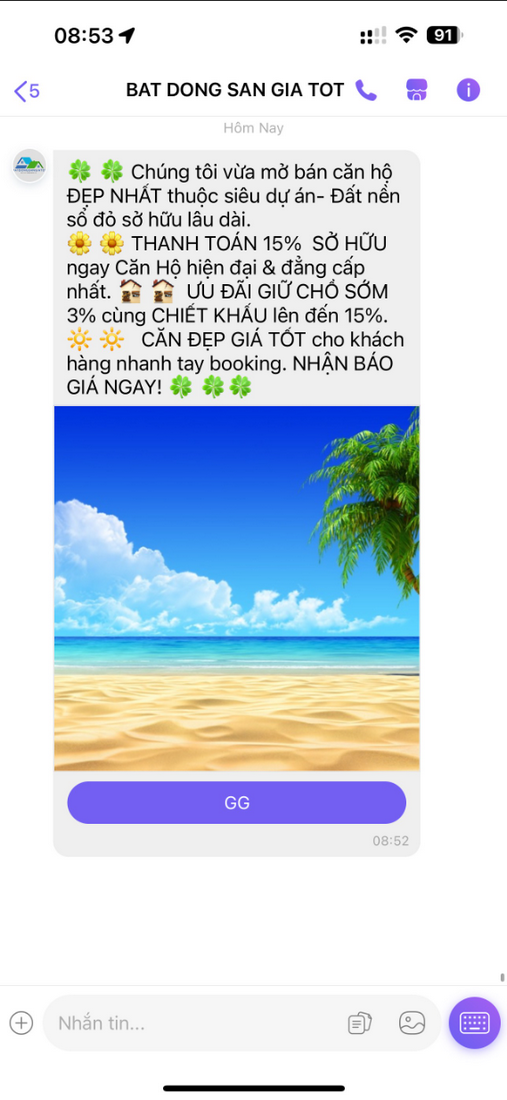
This endpoint is used to send Viber messages by individually or with bulk requests.

It is ideal to send the personalized messages for use-cases like notifications, alerting or marketing for example.

<figure><img src="https://content.gitbook.com/content/gvYN7iYX2mcz12RYa3ZR/blobs/6vIrLe7uHjrZnfLqkX1m/h%C3%ACnh%20l%C3%AAn%20viber.png" alt=""><figcaption><p>Hình mẫu tin nhắn Viber</p></figcaption></figure>

## HTTP request

\ <mark style="color:yellow;">**`POST`**</mark> [https://rest.esms.vn/MainService.svc/json/Send\_Multiple\_Sms\_OTT/](http://rest.esms.vn/MainService.svc/json/Send_Multiple_Sms_OTT/)

* **Content Type:** <mark style="color:orange;">application/json</mark>
* **Response Type:** <mark style="color:orange;">application/json</mark>

{% code overflow="wrap" %}

```json
curl --location 'https://rest.esms.vn/MainService.svc/json/Send_Multiple_Sms_OTT/' \
--header 'Content-Type: application/json' \
--data '{
    "ApiKey": "{{ApiKey}}",
    "SecretKey": "{{SecretKey}}",
    "Brandname": "{{Brandname}}",
    "SmsType": "23",
    "Content": "{{Content}}",
    "OttImgUrl": "{{OttImgUrl}}",
    "OttLabel": "{{OttLabel}}",
    "OttUrl": "{{OttUrl}}",
    "Phones": [
        "{{Phone1}}","{{Phone2}}","{{Phone3}}"
    ],
    "IsSandBox": "{{IsSandBox}}",
    "RequestId": "{{RequestId}}",
    "CallbackUrl": "{{CallbackUrl}}"
}'
```

{% endcode %}

* **Request body**

<table><thead><tr><th width="175">Parameter</th><th width="148">Type</th><th width="143" data-type="checkbox">Required</th><th>Description</th></tr></thead><tbody><tr><td>ApiKey</td><td>string</td><td>true</td><td>Your API Key.</td></tr><tr><td>SecretKey</td><td>string</td><td>true</td><td>Your Secret Key.</td></tr><tr><td>Brandname</td><td>string</td><td>true</td><td>The name of the sender is shown in the header of the customer's message. <br><strong>Pre-registration is required.</strong></td></tr><tr><td>SmsType</td><td>number</td><td>true</td><td>Message type:<br>23: OTT message via Viber.</td></tr><tr><td>Content</td><td>string</td><td>true</td><td>The personized or marketing content.</td></tr><tr><td>OttImgUrl</td><td>string</td><td>false</td><td>The URL of image. The schema has to be <strong>https</strong>.</td></tr><tr><td>OTTLabel</td><td>string</td><td>false</td><td>The label of button.</td></tr><tr><td>OttUrl</td><td>string</td><td>false</td><td>The redirect URL when clicking to the button.</td></tr><tr><td>Phones</td><td>Array</td><td>true</td><td>The list phone number of receivers.</td></tr><tr><td>IsSandBox</td><td>number</td><td>false</td><td>Sandbox option value (<strong>default is 0</strong>):<br>1: For testing purpose to verify the validation of the request. Message is not charged and sent to the receiver.<br>0: Message will be processed to the receiver properly.</td></tr><tr><td>RequestId</td><td>string</td><td>false</td><td>Partner ID passed to block duplicates and check if needed.<br>Maximum length 50 characters.<br>Each RequestId passed is valid for blocking for 24 hours.</td></tr><tr><td>CallbackUrl</td><td>string</td><td>false</td><td>The webhook URL that will receive the status of message after it processed to the operator. It is used for determine whether the SMS is succcessfully delivered to the receiver or failed.<br>See the sample request at <a href="https://samplefordevelopers.esms.vn/#20f85e1f-3d9e-4ff4-bc4f-8d9c9edbc88a">here</a>.<br>More details at <a href="../callback-url">here</a>.</td></tr></tbody></table>

* <mark style="color:yellow;">**`Note:`**</mark> Sending the message via Viber, there are 4 sending options can be used:

| Content Type          | Params required                                   |
| --------------------- | ------------------------------------------------- |
| Text - Image - Button | <p>Content<br>OttImgUrl<br>OttUrl<br>OTTLabel</p> |
| Text - Button         | <p>Content<br>OttUrl<br>OTTLabel</p>              |
| Image                 | OttImgUrl                                         |
| Text                  | Content                                           |

***

* **Response:**

{% tabs %}
{% tab title="100" %}

```json
{
    "CodeResult": "100",
    "CountRegenerate": 0,
    "SMSID": "d8e0f1f0702544b2acb456ca9ccfd111250"
}
```

**Valid request.**
{% endtab %}

{% tab title="101" %}

```json
{
    "CodeResult": "101",
    "CountRegenerate": 0,
    "ErrorMessage": "Authorize Failed"
}
```

**Invalid credentials.**
{% endtab %}

{% tab title="104" %}

```json
{
    "CodeResult": "104",
    "CountRegenerate": 0,
    "ErrorMessage": "Brand name code is not exist"
}
```

**Invalid brandname.**
{% endtab %}
{% endtabs %}

* **Response body**

| Parameter    | Type   | Description                                  |
| ------------ | ------ | -------------------------------------------- |
| CodeResult   | string | Response code.                               |
| SMSID        | string | The message id eSMS system.                  |
| ErrorMessage | string | The error message if the request is invalid. |

* *<mark style="color:yellow;">**The detail of error code can refer at**</mark>* [**Table of error codes**](https://developers.esms.vn/en/esms-api/table-of-error-codes) **.**
* *<mark style="color:yellow;">**Get the  sample of code for programing languagues to use in Postman refer at**</mark>* [**Link  of code samples**](https://samplefordevelopers.esms.vn/#850974b9-12cf-46f5-946c-e8e15aa3585b)**.**
